

Run AI Locally. Keep Your Data Yours.
Cloud AI services are powerful — but they come with real problems: subscription fees that compound every month, data leaving your building, and performance that depends on someone else's infrastructure. A local AI runs entirely on hardware you own, on your premises, accessible only to your team. No usage limits. No per-query billing. No wondering where your business data goes.We help small and mid-sized businesses find the right local AI setup for their needs and budget. There are currently three practical paths to get there — each with its own strengths depending on how you work, what tools you use, and how large the AI models you want to run are.
Option 1: NVIDIA DGX SparkThe Professional AI Workstation That Fits on a Desk
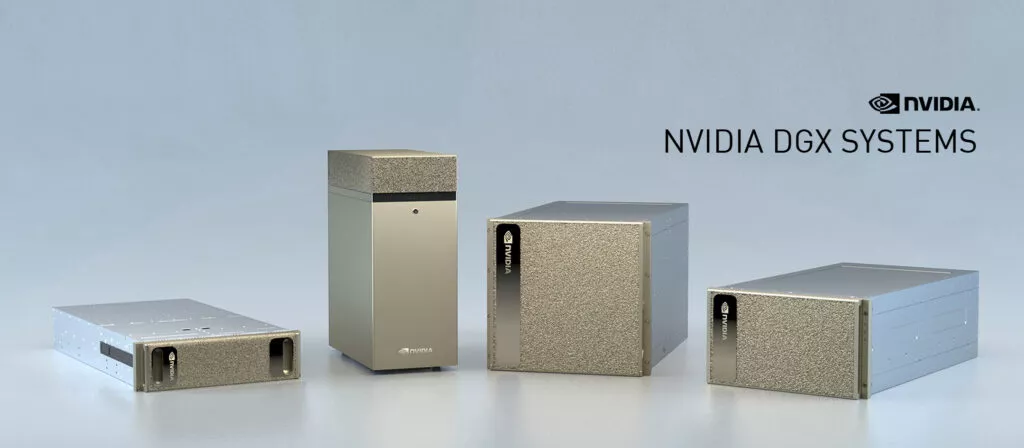
If you want the most capable, purpose-built local AI system available today — one that runs the same software stack used in enterprise data centers — the NVIDIA DGX Spark is the answer. It is not a gaming PC with a fast graphics card. It is a dedicated AI computer, engineered from the ground up to run, fine-tune, and develop with large language models entirely on-premise.
The DGX Spark is built around NVIDIA's GB10 Grace Blackwell Superchip — the same Blackwell architecture found in NVIDIA's data center products, scaled down into a desktop unit roughly the size of a hardcover book (about 6" × 6" × 2"). Despite its compact footprint, it delivers up to 1 Petaflop of AI performance at FP4 precision, which is a level of compute that would have required a server rack just a few years ago.The system runs on 20 ARM processor cores paired with a Blackwell GPU, and critically, both share 128 GB of unified memory. This means the AI model and the rest of the system work from the same large, fast memory pool with no bottlenecks between the processor and the GPU. It draws roughly 140 watts — less than many desktop computers — making it practical to run continuously in an office environment without special power requirements.
What It Can Run
With 128 GB of unified memory, the DGX Spark can load and run AI models with up to 200 billion parameters directly in memory. For context, most capable open-source models used in business settings today — Llama 3, Mistral, Qwen, DeepSeek — fall well within that range. Two DGX Spark units can be connected together to handle models up to 405 billion parameters.The system ships with NVIDIA DGX OS and the full NVIDIA AI Enterprise software stack, which means you are not piecing together open-source tools on your own. The environment is pre-configured and maintained, matching what enterprise AI teams use in production. When your needs grow from a prototype to a deployed product, the same workflow transitions with minimal friction.
Who It Is For
The DGX Spark is the right choice for businesses that want a professional-grade AI environment, not just a fast consumer PC. It suits teams who are actively developing AI tools, fine-tuning models on their own data, or who need a reliable, supported platform they can count on long-term. It is also well suited for regulated industries — healthcare, legal, finance — where keeping sensitive data entirely off the internet is non-negotiable.It is worth being honest about one trade-off: the LPDDR5x memory in the DGX Spark has lower raw bandwidth than high-end discrete graphics cards. For pure inference speed — generating responses as fast as possible — a workstation with multiple high-VRAM GPUs can produce tokens faster. The DGX Spark's strength is its large memory capacity, its NVIDIA-managed software ecosystem, its efficiency, and its compact professional form factor.
Pricing
The DGX Spark (Founders Edition) is currently priced at $4,699. Versions are also available through ASUS, Dell, Lenovo, and other partners, with configurations and pricing that vary by storage and memory options.
Option 2: Unified Memory — Apple and AMD AI PCs
A Large, Shared Memory Pool — Without the Data Center Price Tag
The most fundamental challenge in running large AI models locally is memory. A model like Llama 3 70B requires roughly 40 GB just to load into memory before it can respond to a single question. Consumer graphics cards typically top out at 16–24 GB of dedicated video memory, which means many capable models simply cannot fit — they get split between GPU memory and slower system RAM, dramatically reducing performance.Unified memory architecture solves this by giving the GPU and CPU direct access to the same large pool of fast memory. There is no separate "video RAM" ceiling. The entire pool — whether that's 64 GB, 128 GB, or 192 GB — is available to the AI model. Two hardware families have made this practical for business use: Apple Silicon Macs and AMD's Ryzen AI Max platform.Apple Mac Mini and Mac StudioSilent. Compact. Surprisingly Capable.Apple Silicon — the M-series chips inside the Mac Mini and Mac Studio — was designed around unified memory from the start. The CPU, GPU, and Apple's dedicated Neural Engine all share a single high-bandwidth memory pool with no PCIe data transfer overhead between them. For AI inference, this architecture punches well above its price class.
Current Lineup
Apple's current Mac lineup (as of late 2026) spans a wide range of capabilities and budgets:
Mac Mini with M6 — starts at $899 — 16 GB unified memory (upgradeable). An excellent entry point for running small to mid-size models (7B–13B) in a fanless, power-sipping desktop.
Mac Mini with M5 Pro — starts at $1,699 — higher memory bandwidth and up to 64 GB unified memory. Comfortably runs 32B–70B class models.
Mac Studio with M5 Max — starts at $2,499 — up to 128 GB unified memory with very high memory bandwidth. Runs frontier-class models smoothly.
Mac Studio with M5 Ultra — starts at $5,499 — up to 192 GB unified memory. Can load and run the largest open-source models available today at full precision.
What It Can Run
The rule of thumb: memory capacity determines which models will fit; memory bandwidth determines how fast responses come back. A Mac Studio with 64 GB handles Llama 3 70B comfortably. At 128 GB, you can run models like DeepSeek R1 and large multimodal models. At 192 GB, you are running the most capable locally-available open models with headroom to spare.Tools like Ollama, LM Studio, and Jan run natively on Apple Silicon and are straightforward enough for non-technical staff to operate after initial setup. Apple's Neural Engine accelerates certain AI tasks further, particularly the initial processing step when a conversation begins.
Who It Is For
The Mac family is the best starting point for most small businesses — especially those already working in macOS or who want a low-maintenance, low-noise, energy-efficient AI server that can sit on a desk or in a wiring closet. The Mac Mini in particular offers an extraordinary amount of AI capability per dollar spent. It requires no special power, no external cooling, and almost no IT overhead to keep running.The main consideration is the Apple ecosystem: these machines run macOS. If your business is Windows-only, you can still run AI models through a network interface (where staff access the AI from any browser or Windows app), but the Mac itself is the server.
AMD Ryzen AI Max — AI PCs with Unified Memory
Windows-Native, Massive Memory, Open Platform
AMD's Ryzen AI Max platform — particularly the flagship Ryzen AI Max+ 395 processor — brings the same unified memory concept to Windows workstations, with some important advantages. These systems support up to 192 GB of LPDDR5X unified memory, and through AMD's Variable Graphics Memory feature, virtually the entire pool can be allocated as GPU memory for AI workloads.
Current Systems
AMD Ryzen AI Halo Developer Platform (available at Micro Center) — $3,999 — 128 GB unified memory, 16 Zen 5 cores, integrated Radeon 8060S GPU, 10 GbE networking, Wi-Fi 7.
Third-party systems from builders like GEEKOM — approximately $2,999–$5,999 depending on memory and storage configuration.
These are compact workstation-class machines, not traditional tower PCs. Most are similar in form factor to the Mac Mini — small, quiet, designed to run continuously.
What It Can Run
With 128–192 GB of unified memory available, an AMD AI PC can run models that are simply out of reach for anything with a fixed 16 or 24 GB VRAM ceiling. DeepSeek R1, Llama 3 405B (in quantized form), Mixtral, and other large mixture-of-experts models run well on this platform. AMD's architecture is particularly efficient with mixture-of-experts models, where only a portion of the model's parameters are active at any time — meaning high intelligence at lower memory bandwidth cost.The processor handles the workload through a three-way collaboration: the NPU (Neural Processing Unit) speeds up the initial response, the integrated Radeon GPU handles the token generation using the full unified memory pool, and the Zen 5 CPU manages everything else. Tools like LM Studio, llama.cpp, and AMD's own Lemonade SDK are optimized for this workflow.
Who It Is For
The AMD Ryzen AI Max platform is the natural choice for businesses that are committed to Windows, want to avoid the Apple ecosystem, or need the flexibility to choose their own hardware vendor and configuration. Because multiple system builders offer these machines, pricing and configuration options are more varied than the Apple lineup. It is also a better fit for teams who want to modify, expand, or manage the system at a lower level than Apple's locked-down environment allows.One honest trade-off: like the DGX Spark, the bandwidth of unified system memory is lower than dedicated GDDR6 video memory. For dense models, generation speed will be slower than a workstation running a card like the AMD Radeon AI PRO R9700. For large models that simply cannot fit in 32 GB of VRAM, unified memory is the only practical local option.
Option 3: Discrete GPU — AMD Radeon AI PRO R9700
32 GB of Fast Dedicated Video Memory — The Speed Option
The third path to local AI is the most familiar to anyone who has worked with AI tooling before: a dedicated graphics card with a large, fast VRAM pool. The AMD Radeon AI PRO R9700 is the current standout in this category for businesses that want raw speed and a practical price point, rather than maximum model size.
What It Is
The Radeon AI PRO R9700 is a professional-grade GPU built on AMD's RDNA 4 architecture. It carries 32 GB of GDDR6 video memory — double the capacity of most consumer gaming cards — connected via a 256-bit memory interface delivering 640 GB/s of memory bandwidth. For comparison, that bandwidth figure is more than double what unified memory systems typically achieve, and it is what gives dedicated GPUs their token generation speed advantage.The card includes 64 compute units and 128 second-generation AI accelerators, and connects to a workstation motherboard via PCIe 5.0 x16. It draws 300 watts and uses a single 16-pin power connector. The blower-style cooling design is intentional: it exhausts heat out the rear of the case, making it practical to install multiple cards in a single workstation without the cards overheating each other.What It Can Run32 GB of VRAM is enough to load and run a wide range of capable models without touching system RAM — which is where the speed advantage comes from. Models like DeepSeek R1 (smaller variants), Mistral Large, Qwen 2.5 72B (at Q4 quantization), and image generation models like Flux.1 all run at full GPU speed. Response times are faster than unified memory solutions for models that fit within 32 GB.For models larger than 32 GB, the system will begin offloading layers to system RAM — which slows things down significantly. This is the ceiling for the discrete GPU approach: if you regularly need to run 70B+ parameter models at higher precision, unified memory or the DGX Spark will serve you better.Up to four R9700 cards can be installed in a compatible workstation, giving a theoretical maximum of 128 GB of combined VRAM across the system — though multi-GPU AI inference requires additional configuration.
Who It Is For
The Radeon AI PRO R9700 is the right choice for businesses that want to add local AI capability to an existing Windows or Linux workstation, or who are building a new workstation and want the fastest possible response times for models in the 7B–70B range. At $1,299 MSRP for the card alone, it is the most cost-effective entry point among the three options — particularly for a business that already has a capable workstation chassis.It is also the right choice for teams running AI image generation pipelines, where VRAM speed and capacity directly impact how quickly images render and at what resolution.The software side uses AMD's ROCm stack. ROCm has strong support on Linux and solid, improving support on Windows. Most popular AI tools — llama.cpp, Automatic1111, ComfyUI, Ollama — have ROCm-compatible builds. If your team is comfortable with a bit of technical setup, this is a highly capable and cost-effective platform. If you want something more plug-and-play, the Apple or DGX Spark options require less configuration.
Pricing
The AMD Radeon AI PRO R9700 has an MSRP of $1,299 for the card. A complete workstation — case, motherboard, CPU, RAM, power supply, and storage — will add to that cost, typically bringing a full build to the $2,500–$4,000 range depending on specifications. This can be a strong value for businesses that need GPU-speed inference and have the technical comfort to manage a custom build.
Not Sure Which Path Is Right for You?
Every business has different needs, different budgets, and different comfort levels with technology. There is no single right answer — which is why we work with you to understand how you actually plan to use AI, what your IT environment looks like, and what realistic budget makes sense before recommending any hardware.We handle procurement, setup, model configuration, and ongoing support. If you want to run a private AI assistant for your team, automate document processing, or analyze data that never leaves your building, we can get you there on hardware you own outright — with no monthly API bills and no cloud dependency.
Get in touch to start the conversation.
Cloud AI services are powerful — but they come with real problems: subscription fees that compound every month, data leaving your building, and performance that depends on someone else's infrastructure. A local AI runs entirely on hardware you own, on your premises, accessible only to your team. No usage limits. No per-query billing. No wondering where your business data goes.We help small and mid-sized businesses find the right local AI setup for their needs and budget. There are currently three practical paths to get there — each with its own strengths depending on how you work, what tools you use, and how large the AI models you want to run are.
Option 1: NVIDIA DGX SparkThe Professional AI Workstation That Fits on a Desk
If you want the most capable, purpose-built local AI system available today — one that runs the same software stack used in enterprise data centers — the NVIDIA DGX Spark is the answer. It is not a gaming PC with a fast graphics card. It is a dedicated AI computer, engineered from the ground up to run, fine-tune, and develop with large language models entirely on-premise.
The DGX Spark is built around NVIDIA's GB10 Grace Blackwell Superchip — the same Blackwell architecture found in NVIDIA's data center products, scaled down into a desktop unit roughly the size of a hardcover book (about 6" × 6" × 2"). Despite its compact footprint, it delivers up to 1 Petaflop of AI performance at FP4 precision, which is a level of compute that would have required a server rack just a few years ago.The system runs on 20 ARM processor cores paired with a Blackwell GPU, and critically, both share 128 GB of unified memory. This means the AI model and the rest of the system work from the same large, fast memory pool with no bottlenecks between the processor and the GPU. It draws roughly 140 watts — less than many desktop computers — making it practical to run continuously in an office environment without special power requirements.
What It Can Run
With 128 GB of unified memory, the DGX Spark can load and run AI models with up to 200 billion parameters directly in memory. For context, most capable open-source models used in business settings today — Llama 3, Mistral, Qwen, DeepSeek — fall well within that range. Two DGX Spark units can be connected together to handle models up to 405 billion parameters.The system ships with NVIDIA DGX OS and the full NVIDIA AI Enterprise software stack, which means you are not piecing together open-source tools on your own. The environment is pre-configured and maintained, matching what enterprise AI teams use in production. When your needs grow from a prototype to a deployed product, the same workflow transitions with minimal friction.
Who It Is For
The DGX Spark is the right choice for businesses that want a professional-grade AI environment, not just a fast consumer PC. It suits teams who are actively developing AI tools, fine-tuning models on their own data, or who need a reliable, supported platform they can count on long-term. It is also well suited for regulated industries — healthcare, legal, finance — where keeping sensitive data entirely off the internet is non-negotiable.It is worth being honest about one trade-off: the LPDDR5x memory in the DGX Spark has lower raw bandwidth than high-end discrete graphics cards. For pure inference speed — generating responses as fast as possible — a workstation with multiple high-VRAM GPUs can produce tokens faster. The DGX Spark's strength is its large memory capacity, its NVIDIA-managed software ecosystem, its efficiency, and its compact professional form factor.
Pricing
The DGX Spark (Founders Edition) is currently priced at $4,699. Versions are also available through ASUS, Dell, Lenovo, and other partners, with configurations and pricing that vary by storage and memory options.
Option 2: Unified Memory — Apple and AMD AI PCs
A Large, Shared Memory Pool — Without the Data Center Price Tag
The most fundamental challenge in running large AI models locally is memory. A model like Llama 3 70B requires roughly 40 GB just to load into memory before it can respond to a single question. Consumer graphics cards typically top out at 16–24 GB of dedicated video memory, which means many capable models simply cannot fit — they get split between GPU memory and slower system RAM, dramatically reducing performance.Unified memory architecture solves this by giving the GPU and CPU direct access to the same large pool of fast memory. There is no separate "video RAM" ceiling. The entire pool — whether that's 64 GB, 128 GB, or 192 GB — is available to the AI model. Two hardware families have made this practical for business use: Apple Silicon Macs and AMD's Ryzen AI Max platform.Apple Mac Mini and Mac StudioSilent. Compact. Surprisingly Capable.Apple Silicon — the M-series chips inside the Mac Mini and Mac Studio — was designed around unified memory from the start. The CPU, GPU, and Apple's dedicated Neural Engine all share a single high-bandwidth memory pool with no PCIe data transfer overhead between them. For AI inference, this architecture punches well above its price class.
Current Lineup
Apple's current Mac lineup (as of late 2026) spans a wide range of capabilities and budgets:
Mac Mini with M6 — starts at $899 — 16 GB unified memory (upgradeable). An excellent entry point for running small to mid-size models (7B–13B) in a fanless, power-sipping desktop.
Mac Mini with M5 Pro — starts at $1,699 — higher memory bandwidth and up to 64 GB unified memory. Comfortably runs 32B–70B class models.
Mac Studio with M5 Max — starts at $2,499 — up to 128 GB unified memory with very high memory bandwidth. Runs frontier-class models smoothly.
Mac Studio with M5 Ultra — starts at $5,499 — up to 192 GB unified memory. Can load and run the largest open-source models available today at full precision.
What It Can Run
The rule of thumb: memory capacity determines which models will fit; memory bandwidth determines how fast responses come back. A Mac Studio with 64 GB handles Llama 3 70B comfortably. At 128 GB, you can run models like DeepSeek R1 and large multimodal models. At 192 GB, you are running the most capable locally-available open models with headroom to spare.Tools like Ollama, LM Studio, and Jan run natively on Apple Silicon and are straightforward enough for non-technical staff to operate after initial setup. Apple's Neural Engine accelerates certain AI tasks further, particularly the initial processing step when a conversation begins.
Who It Is For
The Mac family is the best starting point for most small businesses — especially those already working in macOS or who want a low-maintenance, low-noise, energy-efficient AI server that can sit on a desk or in a wiring closet. The Mac Mini in particular offers an extraordinary amount of AI capability per dollar spent. It requires no special power, no external cooling, and almost no IT overhead to keep running.The main consideration is the Apple ecosystem: these machines run macOS. If your business is Windows-only, you can still run AI models through a network interface (where staff access the AI from any browser or Windows app), but the Mac itself is the server.
AMD Ryzen AI Max — AI PCs with Unified Memory
Windows-Native, Massive Memory, Open Platform
AMD's Ryzen AI Max platform — particularly the flagship Ryzen AI Max+ 395 processor — brings the same unified memory concept to Windows workstations, with some important advantages. These systems support up to 192 GB of LPDDR5X unified memory, and through AMD's Variable Graphics Memory feature, virtually the entire pool can be allocated as GPU memory for AI workloads.
Current Systems
AMD Ryzen AI Halo Developer Platform (available at Micro Center) — $3,999 — 128 GB unified memory, 16 Zen 5 cores, integrated Radeon 8060S GPU, 10 GbE networking, Wi-Fi 7.
Third-party systems from builders like GEEKOM — approximately $2,999–$5,999 depending on memory and storage configuration.
These are compact workstation-class machines, not traditional tower PCs. Most are similar in form factor to the Mac Mini — small, quiet, designed to run continuously.
What It Can Run
With 128–192 GB of unified memory available, an AMD AI PC can run models that are simply out of reach for anything with a fixed 16 or 24 GB VRAM ceiling. DeepSeek R1, Llama 3 405B (in quantized form), Mixtral, and other large mixture-of-experts models run well on this platform. AMD's architecture is particularly efficient with mixture-of-experts models, where only a portion of the model's parameters are active at any time — meaning high intelligence at lower memory bandwidth cost.The processor handles the workload through a three-way collaboration: the NPU (Neural Processing Unit) speeds up the initial response, the integrated Radeon GPU handles the token generation using the full unified memory pool, and the Zen 5 CPU manages everything else. Tools like LM Studio, llama.cpp, and AMD's own Lemonade SDK are optimized for this workflow.
Who It Is For
The AMD Ryzen AI Max platform is the natural choice for businesses that are committed to Windows, want to avoid the Apple ecosystem, or need the flexibility to choose their own hardware vendor and configuration. Because multiple system builders offer these machines, pricing and configuration options are more varied than the Apple lineup. It is also a better fit for teams who want to modify, expand, or manage the system at a lower level than Apple's locked-down environment allows.One honest trade-off: like the DGX Spark, the bandwidth of unified system memory is lower than dedicated GDDR6 video memory. For dense models, generation speed will be slower than a workstation running a card like the AMD Radeon AI PRO R9700. For large models that simply cannot fit in 32 GB of VRAM, unified memory is the only practical local option.
Option 3: Discrete GPU — AMD Radeon AI PRO R9700
32 GB of Fast Dedicated Video Memory — The Speed Option
The third path to local AI is the most familiar to anyone who has worked with AI tooling before: a dedicated graphics card with a large, fast VRAM pool. The AMD Radeon AI PRO R9700 is the current standout in this category for businesses that want raw speed and a practical price point, rather than maximum model size.
What It Is
The Radeon AI PRO R9700 is a professional-grade GPU built on AMD's RDNA 4 architecture. It carries 32 GB of GDDR6 video memory — double the capacity of most consumer gaming cards — connected via a 256-bit memory interface delivering 640 GB/s of memory bandwidth. For comparison, that bandwidth figure is more than double what unified memory systems typically achieve, and it is what gives dedicated GPUs their token generation speed advantage.The card includes 64 compute units and 128 second-generation AI accelerators, and connects to a workstation motherboard via PCIe 5.0 x16. It draws 300 watts and uses a single 16-pin power connector. The blower-style cooling design is intentional: it exhausts heat out the rear of the case, making it practical to install multiple cards in a single workstation without the cards overheating each other.What It Can Run32 GB of VRAM is enough to load and run a wide range of capable models without touching system RAM — which is where the speed advantage comes from. Models like DeepSeek R1 (smaller variants), Mistral Large, Qwen 2.5 72B (at Q4 quantization), and image generation models like Flux.1 all run at full GPU speed. Response times are faster than unified memory solutions for models that fit within 32 GB.For models larger than 32 GB, the system will begin offloading layers to system RAM — which slows things down significantly. This is the ceiling for the discrete GPU approach: if you regularly need to run 70B+ parameter models at higher precision, unified memory or the DGX Spark will serve you better.Up to four R9700 cards can be installed in a compatible workstation, giving a theoretical maximum of 128 GB of combined VRAM across the system — though multi-GPU AI inference requires additional configuration.
Who It Is For
The Radeon AI PRO R9700 is the right choice for businesses that want to add local AI capability to an existing Windows or Linux workstation, or who are building a new workstation and want the fastest possible response times for models in the 7B–70B range. At $1,299 MSRP for the card alone, it is the most cost-effective entry point among the three options — particularly for a business that already has a capable workstation chassis.It is also the right choice for teams running AI image generation pipelines, where VRAM speed and capacity directly impact how quickly images render and at what resolution.The software side uses AMD's ROCm stack. ROCm has strong support on Linux and solid, improving support on Windows. Most popular AI tools — llama.cpp, Automatic1111, ComfyUI, Ollama — have ROCm-compatible builds. If your team is comfortable with a bit of technical setup, this is a highly capable and cost-effective platform. If you want something more plug-and-play, the Apple or DGX Spark options require less configuration.
Pricing
The AMD Radeon AI PRO R9700 has an MSRP of $1,299 for the card. A complete workstation — case, motherboard, CPU, RAM, power supply, and storage — will add to that cost, typically bringing a full build to the $2,500–$4,000 range depending on specifications. This can be a strong value for businesses that need GPU-speed inference and have the technical comfort to manage a custom build.
Not Sure Which Path Is Right for You?
Every business has different needs, different budgets, and different comfort levels with technology. There is no single right answer — which is why we work with you to understand how you actually plan to use AI, what your IT environment looks like, and what realistic budget makes sense before recommending any hardware.We handle procurement, setup, model configuration, and ongoing support. If you want to run a private AI assistant for your team, automate document processing, or analyze data that never leaves your building, we can get you there on hardware you own outright — with no monthly API bills and no cloud dependency.
Get in touch to start the conversation.
